Project Overview
Project Title: Human-Robot Interaction for Disaster Management
Course: COMP 4461 - Human-Computer Interaction
Objective: Design and implement a working HRI solution (voice agent/chatbot/physical robot) that facilitates disaster management in real-world scenarios.
Methodology: Design Thinking Process with Functional Prototype Development
Personal Diary
Empathize: User Research & Interviews
To understand the real needs of people affected by disasters, we conducted interviews with survivors and rescue personnel. These conversations helped us identify critical pain points and opportunities for HRI solutions in disaster management scenarios.
Interview 1: Mental Health - Survivor Perspective
Context: Understanding the psychological impact on earthquake survivors
Interviewer: Hello, thank you for agreeing to the interview. How has your mental state been since the earthquake?
Survivor: Very anxious, I can't sleep well, always worried about aftershocks.
Interviewer: I understand. Have you tried anything to cope?
Survivor: Talking with family and joining community activities have helped a bit.
Interviewer: Thank you for sharing, and I wish you a speedy recovery.
Key Insights:
- Persistent anxiety and sleep disturbance after disasters
- Fear of aftershocks creates ongoing psychological stress
- Social connection and community support are crucial for coping
- Opportunity: HRI solution could provide constant emotional support and anxiety management
Interview 2: Mental Health - Rescue Personnel
Context: Exploring the psychological burden on rescue workers
Interviewer: Hello, thank you for your rescue efforts and this interview. How has the stress of rescue missions affected you?
Rescuer: It's overwhelming, especially when rescues fail; I feel I didn't do enough and get anxious, even depressed.
Interviewer: That sense of responsibility must be heavy. How do you cope with these feelings?
Rescuer: I talk with teammates for support and try to rest, but the guilt is hard to shake.
Interviewer: Thank you for sharing; I wish you peace and strength.
Key Insights:
- Rescue personnel experience severe emotional burden and guilt
- Failed rescue attempts lead to anxiety and depression
- Peer support helps but doesn't fully address psychological trauma
- Opportunity: AI companion could provide non-judgmental emotional support and professional mental health resources
Interview 3: Real-time Information Provision
Context: Assessing the importance of timely information during disaster relief
Interviewer: Hello, thank you for the interview. How important is real-time information on relief supply distribution to you?
Survivor: Very important; timely updates on food and water locations reduce our anxiety.
Interviewer: Do you find the current information updates fast enough?
Survivor: Sometimes the information is delayed or unclear, and I've had to go multiple times to get supplies.
Interviewer: Thank you for sharing; I hope things improve.
Key Insights:
- Real-time information is critical for reducing survivor anxiety
- Current information systems have delays and clarity issues
- Wasted trips due to outdated information cause frustration and resource waste
- Opportunity: Chatbot/voice agent could provide accurate, real-time updates on supply locations and availability
Interview 4: Non-professional Rescuers
Context: Understanding challenges faced by volunteer rescuers without professional training
Interviewer: Hello, thank you for joining the rescue efforts. What challenges did you face as a volunteer?
Rescuer: Without experience, I felt panicked, like not knowing how to safely move the injured, which slowed things down.
Interviewer: Would support from a professional rescuer improve efficiency?
Rescuer: Definitely, their guidance would help us make quicker decisions and avoid mistakes.
Interviewer: Thank you for sharing; your efforts are remarkable.
Key Insights:
- Volunteers lack critical knowledge for safe and effective rescue operations
- Panic and uncertainty slow down rescue efforts
- Real-time professional guidance would significantly improve efficiency
- Opportunity: Voice assistant could provide step-by-step rescue instructions and safety protocols
Summary of Empathy Research
Four Critical Problem Areas Identified:
- Mental Health Support: Both survivors and rescue personnel suffer from anxiety, trauma, and depression
- Information Access: Delayed or unclear information about resources causes frustration and wasted effort
- Professional Guidance: Non-professional volunteers need real-time instruction for safe rescue operations
- Emotional Coping: Limited access to consistent emotional support during and after disasters
These insights directly informed our HRI solution design, ensuring we address real user needs rather than hypothetical scenarios.
Ideate: Synthesizing Insights & Defining Direction
After gathering empathy data, we organized our findings through Hierarchical Task Analysis (HTA) and created detailed user personas to better understand the problem space. This structured approach helped us identify specific opportunities for HRI intervention.
Hierarchical Task Analysis: Information Dissemination
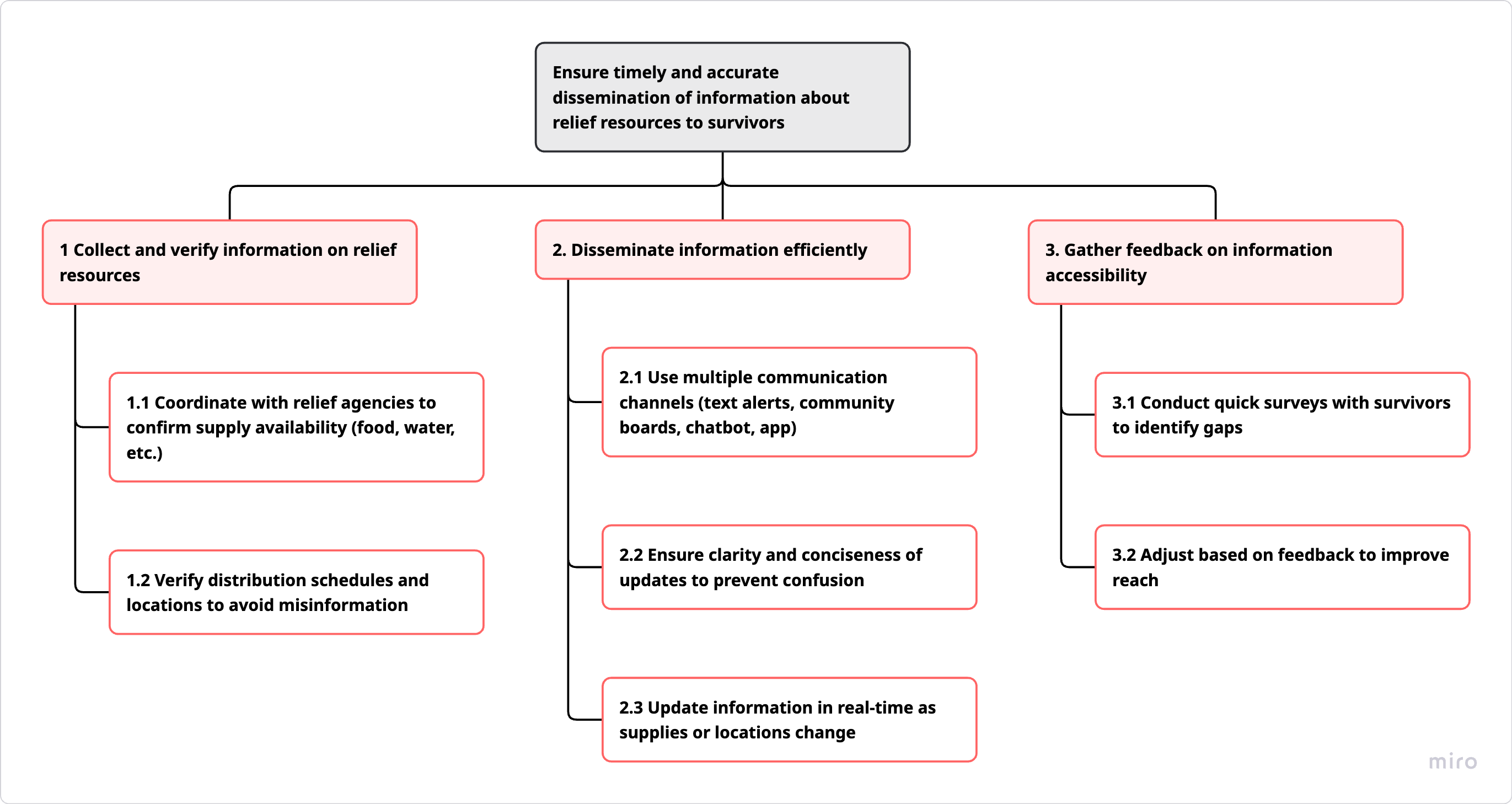
HTA Diagram: Information Dissemination Process
Goal: Ensure timely and accurate dissemination of information about relief resources to survivors
Task 1: Collect and Verify Information on Relief Resources
- 1.1 Coordinate with relief agencies to confirm supply availability (food, water, etc.)
- 1.2 Verify distribution schedules and locations to avoid misinformation
Task 2: Disseminate Information Efficiently
- 2.1 Use multiple communication channels (text alerts, community boards, chatbot, app)
- 2.2 Ensure clarity and conciseness of updates to prevent confusion
- 2.3 Update information in real-time as supplies or locations change
Task 3: Gather Feedback on Information Accessibility
- 3.1 Conduct quick surveys with survivors to identify gaps
- 3.2 Adjust based on feedback to improve reach
💡 HRI Opportunity: A chatbot/voice agent can automate Task 2 and 3, providing instant, accurate information while gathering user feedback simultaneously.
Hierarchical Task Analysis: Volunteer Rescuers
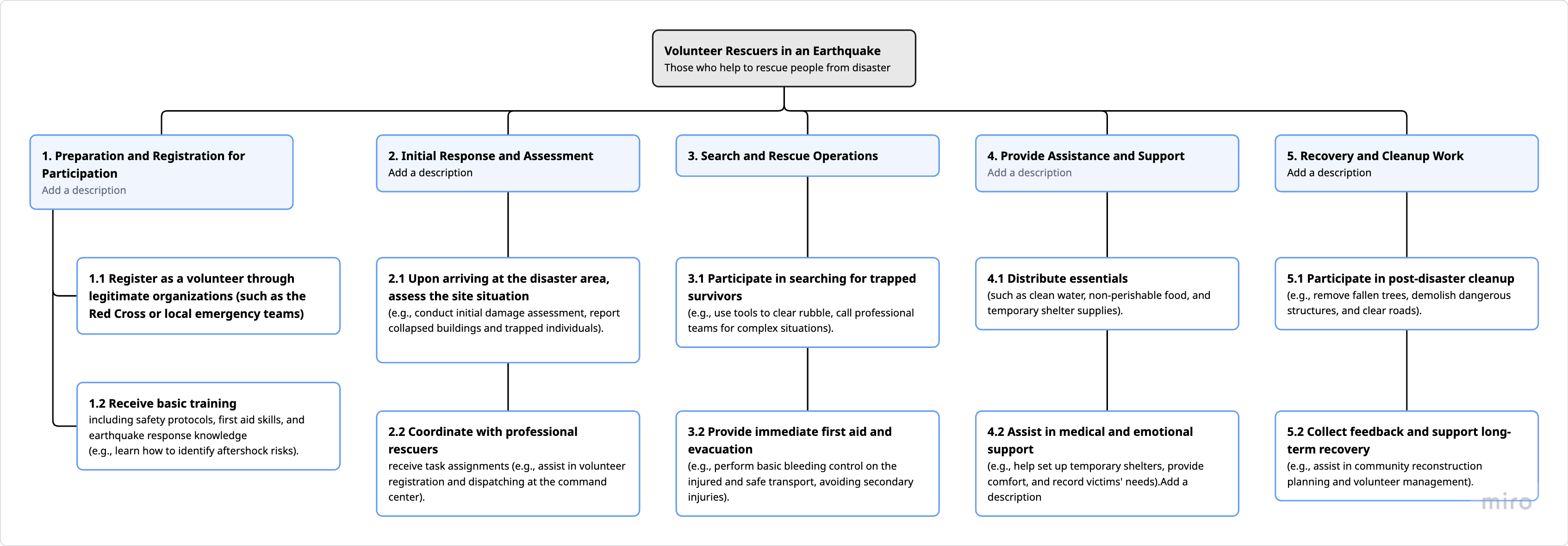
HTA Diagram: Volunteer Rescuers Workflow
User: Volunteer Rescuers in an Earthquake (those who help rescue people from disaster)
1. Preparation & Registration
1.1 Register as volunteer through legitimate organizations
1.2 Receive basic training (safety protocols, first aid, earthquake response)
2. Initial Response & Assessment
2.1 Upon arriving, assess the site situation (damage assessment, trapped individuals)
2.2 Coordinate with professional rescuers for task assignments
3. Search & Rescue Operations
3.1 Participate in searching for trapped survivors
3.2 Provide immediate first aid and evacuation
4. Provide Assistance & Support
4.1 Distribute essentials (clean water, food, shelter supplies)
4.2 Assist in medical and emotional support
5. Recovery & Cleanup
5.1 Participate in post-disaster cleanup
5.2 Collect feedback and support long-term recovery
💡 HRI Opportunity: Voice assistant can guide volunteers through Tasks 2.1, 3.1, 3.2, and 4.2, providing real-time instructions for safe and effective rescue operations.
Hierarchical Task Analysis: Psychological/Mental Health Support
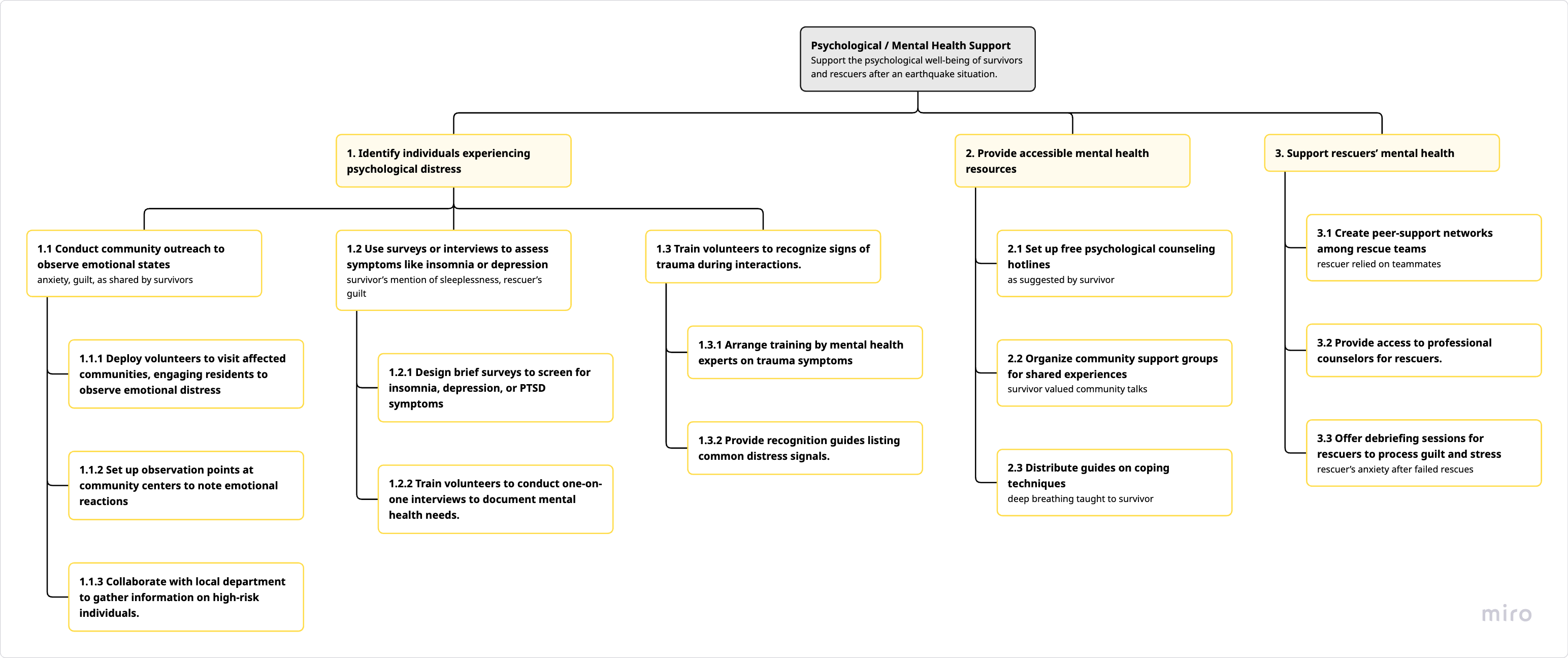
HTA Diagram: Psychological/Mental Health Support Process
Goal: Support the psychological well-being of survivors and rescuers after an earthquake situation
Task 1: Identify Individuals Experiencing Psychological Distress
- 1.1 Conduct community outreach to observe emotional states (anxiety, guilt)
- 1.2 Use surveys or interviews to assess symptoms like insomnia or depression
- 1.3 Train volunteers to recognize signs of trauma during interactions
Task 2: Provide Accessible Mental Health Resources
- 2.1 Set up free psychological counseling hotlines
- 2.2 Organize community support groups for shared experiences
- 2.3 Distribute guides on coping techniques (deep breathing, stress management)
Task 3: Support Rescuers' Mental Health
- 3.1 Create peer-support networks among rescue teams
- 3.2 Provide access to professional counselors for rescuers
- 3.3 Offer debriefing sessions for rescuers to process guilt and stress
💡 HRI Opportunity: An empathetic chatbot can support Tasks 1.2, 2.1, 2.3, 3.1, and 3.3 by providing 24/7 emotional support, coping guidance, and connecting users to professional resources.
User Personas
Based on our empathy research and task analysis, we developed three key user personas to guide our design decisions:
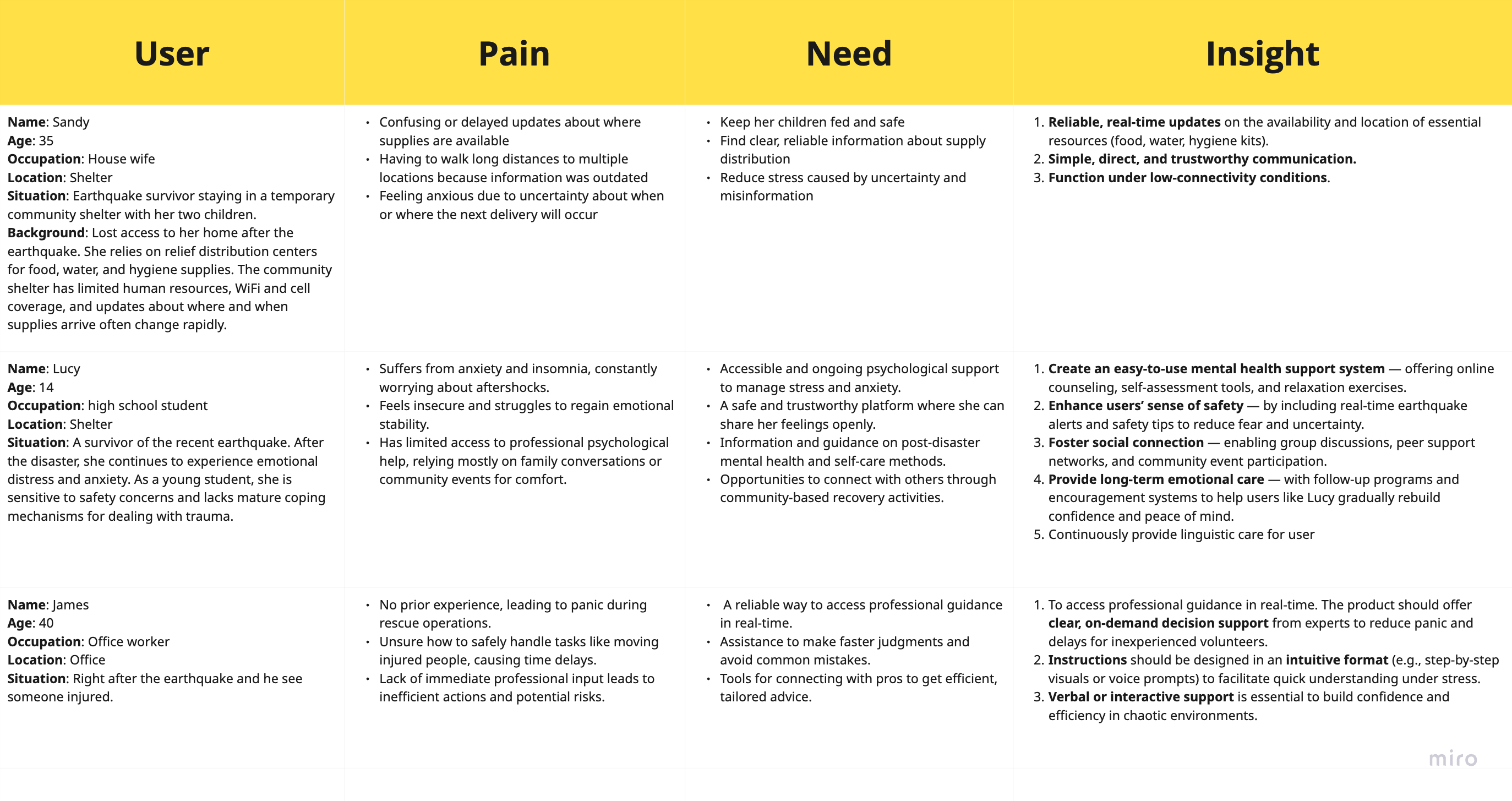
User Personas Overview: Pain Points, Needs, and Design Insights
👩👧👦 Sandy, 35 - House wife at Shelter
Earthquake survivor staying in temporary shelter with her two children
😰 Pain Points
- Confusing or delayed updates about where supplies are available
- Having to walk long distances to multiple locations because information was outdated
- Feeling anxious due to uncertainty about when or where the next delivery will occur
🎯 Needs
- Keep her children fed and safe
- Find clear, reliable information about supply distribution
- Reduce stress caused by uncertainty and misinformation
💡 Design Insights
- Reliable, real-time updates on availability and location of essential resources
- Simple, direct, and straightforward communication
- Function under low-connectivity conditions
Background: Lost access to her home after the earthquake. She relies on relief distribution centers for food, water, and hygiene supplies. The community shelter has limited human resources, WiFi and cell coverage, and updates about where and when supplies arrive often change rapidly.
👧 Lucy, 14 - High School Student at Shelter
Young survivor experiencing emotional distress and anxiety after the earthquake
😰 Pain Points
- Suffers from anxiety and insomnia, constantly worried about aftershocks
- Feels insecure and struggles to regain emotional stability
- Has limited access to professional psychological help, relying on family or community events for comfort
🎯 Needs
- Accessible and ongoing psychological support to manage stress and anxiety
- A safe and trustworthy platform where she can share her feelings openly
- Information and guidance on post-disaster mental health and self-care methods
- Opportunities to connect with others through community-based recovery activities
💡 Design Insights
- Easy-to-use mental health support system — offering online counseling, self-assessment, and relaxation exercises
- Enhance users' sense of safety — including real-time earthquake alerts and safety tips
- Foster social connections — enabling community discussions, peer support, and event participation
- Provide long-term emotional care — with follow-up programs and encouragement systems
- Continuously provide linguistic care for user
Background: A victim of the recent earthquake. After the disaster, she continues to experience emotional distress and anxiety. As a young student, she is sensitive to safety concerns and lacks mature coping mechanisms for dealing with trauma.
👨💼 James, 40 - Office Worker Volunteer
Non-professional volunteer rescuer assisting in earthquake relief efforts
😰 Pain Points
- No prior experience, leading to panic during rescue operations
- Unsure how to safely handle tasks like moving injured people, causing delays
- Lack of immediate professional input leads to inefficient actions and potential risks
🎯 Needs
- A reliable way to access professional guidance in real-time
- Assistance to make faster judgments and avoid common mistakes
- Tools for connecting with pros to get efficient, tailored advice
💡 Design Insights
- To access professional guidance in real-time. Product should offer clear, on-demand decision support from experts to reduce panic and delays
- Instructions should be in intuitive format (e.g., step-by-step visuals or voice prompts) to facilitate quick understanding under stress
- Verbal or interactive support is essential to build confidence and efficiency in chaotic environments
Background: Right after the earthquake he saw someone injured.
Point of View (POV) Statement
This POV statement synthesizes our empathy research, task analysis, and user personas into a clear design challenge that guides our prototyping efforts.
Design: Brainstorming Solutions
Based on our POV statement, we conducted extensive brainstorming sessions to explore potential HRI solutions. We organized our ideas into three main categories aligned with the critical needs identified during our empathy research.
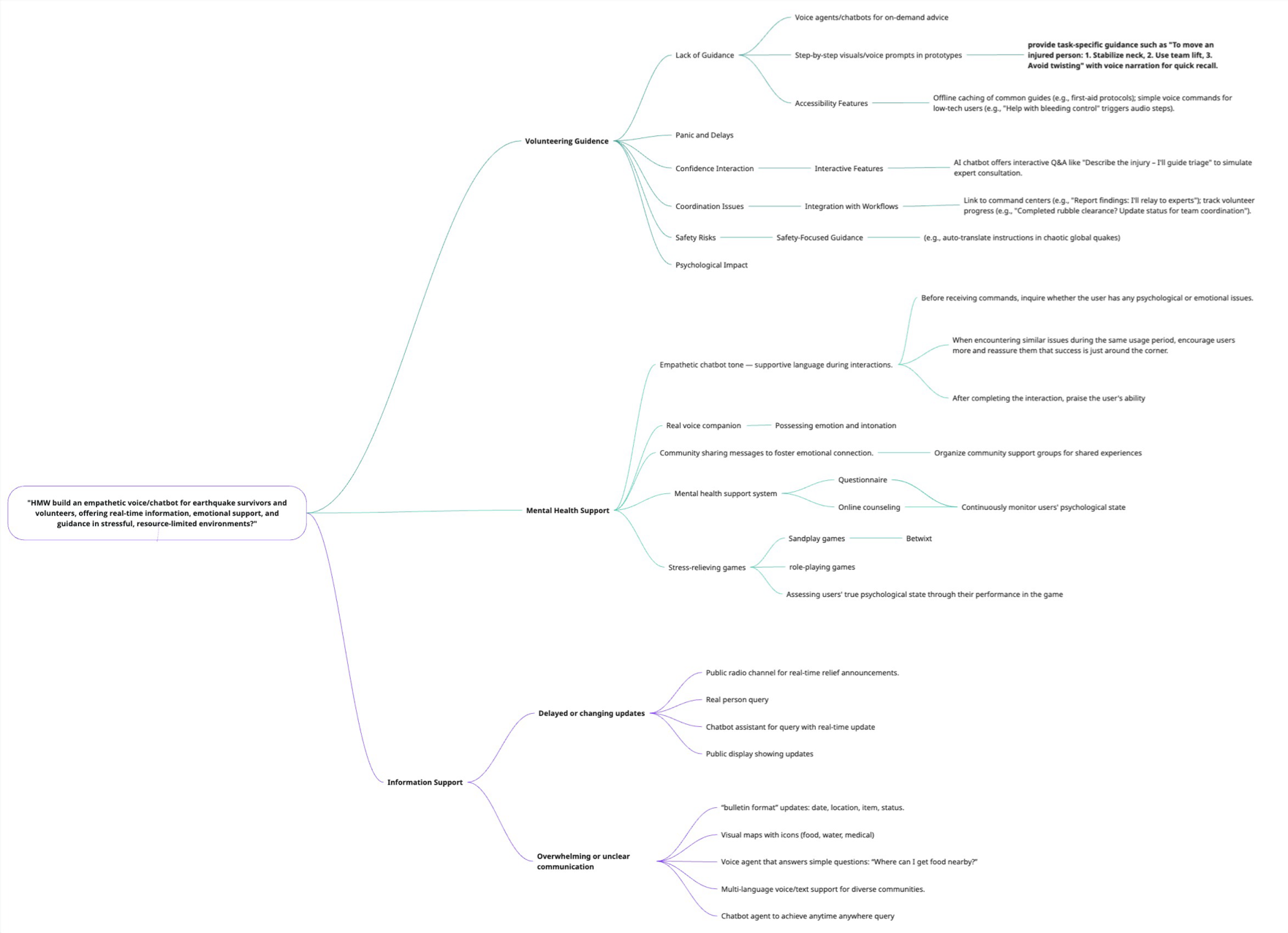
Comprehensive brainstorming mind map showing our three solution categories
Solution Category 1: Volunteering Guidance
Challenge: Non-professional volunteers lack guidance, experience panic and delays, face coordination issues, and are at risk for psychological impact.
🎯 Lack of Guidance Solutions
- Voice agents/chatbots for on-demand advice
- Step-by-step visual/voice prompts in prototypes
- Accessibility features: Offline caching of common guides (e.g., first-aid protocols), simple voice commands for low-tech users, "Help with bleeding control" triggers audio steps
💬 Confidence & Interaction
- Interactive Q&A features: AI chatbot offers interactive dialogue like "Describe the injury - I'll guide triage" to simulate expert consultation
🔗 Coordination & Integration
- Integration with workflows: Link to command centers (e.g., "Report findings. I'll relay to experts" to track volunteer progress like "Completed rubble clearance? Update status for team coordination")
🛡️ Safety & Psychological Support
- Safety-focused guidance: Auto-translate instructions in chaotic global quakes
- Psychological impact management: Before receiving commands, inquire whether the user has any psychological or emotional issues; when encountering similar issues, encourage users more and reassure them that success is just around the corner; after completing the interaction, praise the user's ability
Solution Category 2: Mental Health Support
Challenge: Both survivors and rescuers experience anxiety, trauma, insomnia, and emotional distress with limited access to professional mental health support.
💝 Empathetic Communication
- Empathetic chatbot tone: Supportive language during interactions
- Real voice companion: Possessing emotion and intonation
- Community sharing: Messages to foster emotional connection, organize community support groups for shared experiences
🏥 Mental Health System
- Questionnaire: Screen for symptoms and assess mental health needs
- Online counseling: Continuously monitor users' psychological state and connect to professional resources
🎮 Stress-Relieving Activities
- Stress-relieving games: Simple interactive games to provide distraction and relief
- Sandjoy games: Calming sensory experiences
- Belwit: Mindfulness and relaxation exercises
- Role-playing games: Therapeutic scenarios
- Assessment: Evaluate users' true psychological state through their performance in the games
Solution Category 3: Information Support
Challenge: Survivors receive delayed or changing updates and face overwhelming or unclear communication about relief resources.
📡 Real-Time Information Delivery
- Public radio channel for real-time relief announcements
- Real person query system for direct human assistance
- Chatbot assistant for query with real-time updates
- Public display showing updates in community centers
📋 Clear Communication Formats
- "Bulletin format" updates: Date, location, item, status structured information
- Visual maps with icons (food, water, medical)
- Voice agent that answers simple questions: "Where can I get food nearby?"
- Multi-language voice/text support for diverse communities
- Chatbot agent to achieve anytime anywhere query
Key Design Principles from Brainstorming
- Multi-Modal Interaction: Combine voice, text, and visual interfaces to accommodate different user preferences and connectivity conditions
- Empathy-First Design: Ensure all interactions are emotionally supportive and acknowledge the stress users are experiencing
- Real-Time & Accurate: Prioritize up-to-date information to reduce anxiety and prevent wasted effort
- Accessibility: Design for low-connectivity, low-literacy, and multi-language scenarios
- Progressive Support: Start with simple interactions and provide deeper guidance as needed
- Integration with Existing Systems: Link with command centers and professional resources for seamless coordination
Verify: Storyboarding & Speed Dating
To validate our design concepts before full implementation, we created a storyboard illustrating how our HRI solution would address real user needs in a disaster scenario. This helped us visualize the user journey and communicate our concept to stakeholders.
Storyboard: Helper Bot in Action
.png)
📍 Context
A mother with her children in an emergency shelter after losing their home. They need food, and the kids are scared. The situation is stressful and uncertain.
❗ Problem
"Walked all this way... AGAIN! Always late!" - They repeatedly walk long distances to relief centers only to find supplies are gone or information is outdated.
💡 Intervention (Our Product)
"It works!" - The family uses the Helper Bot chatbot to find real-time information about food supplies. The app shows nearby locations with available resources.
✨ Outcome
"This chatbot saved us! Pass it on!" - Success! The family gets supplies efficiently and shares the solution with their community, creating a ripple effect of positive impact.
Key Insights from Storyboarding:
- Visual storytelling helped stakeholders immediately understand the value proposition
- Identified that successful user experience would lead to organic word-of-mouth promotion
- Confirmed that real-time, location-based information is the critical feature
- Reinforced the importance of simple, intuitive interface design for stressed users
Prototype & Usability Testing
We developed a functional prototype of the Helper Bot chatbot and conducted comprehensive usability testing to evaluate its effectiveness and identify areas for improvement.
Video Prototype Demo
Working prototype demo and user testing video
Usability Test Report
📋 Test Setup
Environment: Quiet room
Recording: Video recording
Duration: 4 minutes
Test Tasks:
- Ask for mental health support
- Locate nearby resources (food, shelter)
- Request a volunteer guide
- Try both voice and text modes
✅ Highlights & Positive Results
- ✓ Task Completion: User easily completed all major tasks without external help
- ✓ Emotional Design: Emotional tone and visual layout received highly positive feedback
- ✓ Voice Interaction: Voice functionality was functional and well-received
- ✓ Overall Result: All tasks passed successfully
- ✓ Completion Time: 4 minutes (efficient and reasonable for disaster scenario)
⚠️ Issues Identified & Recommendations
Issue 1: Location Data Access
Problem: When searching for all nearby resources, the chatbot may not respond correctly because it doesn't have access to the user's location.
Impact: User satisfaction for resource finding: 3/5
Issue 2: Keyword Recognition
Problem: Chatbot may occasionally switch to healthcare replies because "resources" keyword doesn't trigger a list of all resources.
Quantitative Measure: Required 3 attempts to display intended resources correctly
💡 Recommendations for Improvement:
- Location Access: Make the chatbot accessible to devices' location in order to efficiently help the user
- Keyword Awareness: Make the chatbot more aware of the resource keyword and improve intent recognition
🔄 Next Steps & Implementation Plan
1. Location Integration
Add function that tries to access device's location information with user permission
2. NLP Refinement
Finalize and refine the keyword awareness, make it more inclusive and precise
📊 Testing Summary
Overall Assessment: The prototype successfully demonstrated core functionality with strong user satisfaction in emotional design and interface usability. The identified issues are technical improvements that can be addressed in the next iteration without requiring fundamental design changes.
Key Takeaway: The human-centered design approach was validated - users could complete critical disaster-related tasks efficiently, and the empathetic tone resonated well with the target user group.
💻 Technical Implementation
Below is the complete Python implementation of our Helper Bot chatbot system, developed by WANG. The code integrates multi-modal interaction (text and voice), resource search, volunteer guidance, and trauma-informed mental health support.
import streamlit as st
import json
import pyttsx3
import speech_recognition as sr
from openai import AzureOpenAI
# --- Human support trigger detection ---
_HUMAN_SUPPORT_KEYWORDS = [
"human", "real person", "agent", "staff",
"talk to someone", "help from person"
]
def is_human_request(text: str) -> bool:
"""Detect if user is asking for a real person or volunteer."""
if not text:
return False
t = str(text).lower()
return any(k in t for k in _HUMAN_SUPPORT_KEYWORDS)
def recognize_speech_from_mic():
recognizer = sr.Recognizer()
mic = sr.Microphone()
with mic as source:
st.info("🎙️ Listening... please speak now.")
recognizer.adjust_for_ambient_noise(source)
audio = recognizer.listen(source)
try:
text = recognizer.recognize_google(audio)
st.success(f"🗣️ You said: {text}")
return text
except sr.UnknownValueError:
st.warning("😅 Sorry, I couldn't understand.")
return ""
except sr.RequestError:
st.error("Speech recognition failed.")
return ""
def speak_text(text):
try:
engine = pyttsx3.init()
engine.setProperty("rate", 170)
engine.setProperty("volume", 1.0)
voices = engine.getProperty("voices")
for v in voices:
if "english" in v.name.lower():
engine.setProperty("voice", v.id)
break
engine.say(text)
engine.runAndWait()
except Exception as e:
st.warning(f"Voice playback failed: {e}")
# =========================
# Pre-seeded volunteer guides (static, one-shot text)
# =========================
VOLUNTEER_GUIDES = {
"scene_safety_check": {
"title": "Scene Safety Check",
"steps": [
"Look for hazards first: falling debris, gas leaks, fire, unstable walls.",
"Keep yourself safe. Do not enter if the area looks dangerous.",
"Call for help if you see life-threatening danger you cannot control.",
"If safe, approach calmly and introduce yourself before helping."
],
"dos": [
"Keep a safe distance from unstable structures.",
"Use gloves/masks if available.",
"Move slowly and speak clearly."
],
"donts": [
"Do not run into unsafe areas.",
"Do not move heavy debris alone.",
"Do not attempt specialized rescues."
],
"emergency_signs": ["Active fire/gas smell", "Major structural collapse", "Electrical hazards"],
},
"bleeding_control": {
"title": "Control External Bleeding (Basic)",
"steps": [
"Ask the person for consent if responsive; stay calm and explain.",
"Apply firm, direct pressure with a clean cloth/bandage.",
"If bleeding soaks through, add more cloths on top and keep pressure.",
"Elevate the limb if it doesn't cause pain and there's no obvious deformity.",
"If bleeding doesn't slow and you are not trained in tourniquets, keep firm pressure and seek help urgently."
],
"dos": ["Wear gloves if you have them.", "Keep pressing continuously.", "Reassure the person and monitor breathing."],
"donts": ["Do not remove soaked cloths.", "Do not use a tourniquet unless trained.", "Do not apply powders/unknown substances."],
"emergency_signs": ["Soaking through rapidly", "Signs of shock (pale, cold, confusion)", "Breathing problems"],
},
# ... (additional guides omitted for brevity)
}
# =========================
# Pre-seeded rescue resources (static)
# =========================
RESCUE_RESOURCES = [
{
"category": "Food & Water",
"location": "Central Stadium Distribution Point",
"availability": "Available",
"schedule": "Daily 09:00–18:00",
"verified_by": "Red Cross",
"verified_at": "2025-10-21",
"notes": "Bring your ID or registration slip.",
"coordinates": [22.3019, 114.1741],
"tags": ["food", "water", "bottled", "meal", "drink"],
},
{
"category": "Medical Aid",
"location": "City Hospital East Wing",
"availability": "Available",
"schedule": "24/7 emergency desk",
"verified_by": "Health Bureau",
"verified_at": "2025-10-20",
"notes": "Free treatment for registered survivors.",
"coordinates": [22.3055, 114.1712],
"tags": ["medical", "clinic", "hospital", "doctor", "aid"],
},
{
"category": "Mental Health Support station",
"location": "Hope Center Counseling Tent",
"availability": "Available",
"schedule": "Daily 10:00–19:00",
"verified_by": "Psychological Aid Network",
"verified_at": "2025-10-21",
"notes": "Free counseling and stress-relief sessions.",
"coordinates": [22.3124, 114.1672],
"tags": ["mental", "psychological", "support", "counseling", "stress"],
},
# ... (additional resources omitted for brevity)
]
def search_resources(text: str):
"""Search resources based on user query keywords."""
# Implementation details...
pass
def format_resource_card(r: dict) -> str:
"""Format resource information as a card."""
return (
f"**{r['category']}**\n"
f"📍 {r['location']}\n"
f"🕘 {r['schedule']}\n"
f"📦 Status: {r['availability']}\n"
f"✅ Verified by {r['verified_by']} on {r['verified_at']}\n"
f"📝 {r['notes']}"
)
# =========================
# Page config + UI
# =========================
st.set_page_config(
page_title="Post-earthquake Assistance",
page_icon="🙆♀️",
layout="centered",
initial_sidebar_state="expanded",
)
# Language selector
if "lang" not in st.session_state:
st.session_state["lang"] = "English"
lang = st.sidebar.selectbox(
"Language / 语言 / 語言",
["English", "中文", "廣東話"],
index=["English", "中文", "廣東話"].index(st.session_state["lang"])
)
# Input mode: Text or Voice
if "input_mode" not in st.session_state:
st.session_state["input_mode"] = "Text"
st.sidebar.markdown("### Input mode")
st.sidebar.radio(
"Choose how to talk to the bot:",
("Text", "Voice"),
key="input_mode",
horizontal=True
)
# Azure OpenAI setup
with st.sidebar:
st.markdown("### API Key")
openai_api_key = st.text_input("Azure OpenAI API Key", type="password")
if st.button("Reset chat"):
st.session_state.clear()
st.rerun()
client = None
azure_endpoint = "https://hkust.azure-api.net/"
azure_deployment = "gpt-4o-mini"
api_version = "2025-02-01-preview"
if openai_api_key:
client = AzureOpenAI(api_key=openai_api_key, api_version=api_version, azure_endpoint=azure_endpoint)
# =========================
# Chat state machine
# =========================
states = {
"Greeting": {"next": "ExploreFeelings", "description": "Warmly welcome the user.", "collectedDataName": None},
"ExploreFeelings": {"next": "AssessStressLevel", "description": "Encourage the user to share feelings.", "collectedDataName": "feelings"},
"AssessStressLevel": {"next": "OfferCopingStrategies", "description": "Gently explore distress level.", "collectedDataName": "stressLevel"},
"OfferCopingStrategies": {"next": "OfferResources", "description": "Provide coping ideas.", "collectedDataName": None},
"OfferResources": {"next": "Unhandled", "description": "Share helpful resources.", "collectedDataName": None},
"Unhandled": {"next": None, "description": "Handle unclear input.", "collectedDataName": None},
}
def create_model_prompt(user_content):
"""Create trauma-informed prompt for Azure OpenAI."""
current_state = st.session_state["current_state"]
state_description = states[current_state]["description"]
next_s = states[current_state]["next"]
next_desc = states[next_s]["description"] if next_s else state_description
collected_data_json = json.dumps(st.session_state.get("user_data", {}))
return f"""
You are a trauma-informed, compassionate post-earthquake health support assistant for earthquake survivors and rescuers.
Always begin with empathy. Respond ONLY as JSON: {{"isNextState": bool, "resp": string, "data": string}}.
Current state: {current_state} ({state_description})
Next state: {next_s} ({next_desc})
Latest user message: {user_content}
Data collected: {collected_data_json}
"""
# =========================
# Main chat loop
# =========================
# Initialize session state
if "current_state" not in st.session_state:
st.session_state["current_state"] = "Greeting"
st.session_state["user_data"] = {}
if "messages" not in st.session_state:
initial_message = "Hi there, I'm a post-earthquake health support assistant, I am here to help you process your health and find calm after distressing experiences. You can share anything that's on your mind — I'll listen with care. 💛"
st.session_state["messages"] = [{"role": "assistant", "content": {"resp": initial_message}}]
# Display chat history
for msg in st.session_state["messages"]:
role = msg["role"]
resp = msg["content"]["resp"]
avatar = "🙆♀️" if role == "assistant" else "🙂"
with st.chat_message(role, avatar=avatar):
st.markdown(resp)
# Handle user input (text or voice)
user_resp = None
if st.session_state.get("input_mode") == "Voice":
if st.button("🎤 Record Voice"):
txt = recognize_speech_from_mic()
if txt:
user_resp = txt
else:
if resp := st.chat_input("Share anything that's on your mind…"):
user_resp = resp
# Process user input
if user_resp:
# Check for human support request
if is_human_request(user_resp):
response = "Connecting you to a human volunteer... 🤝 Please wait a moment."
st.session_state["messages"].append({"role": "assistant", "content": {"resp": response}})
with st.chat_message("assistant", avatar="🙆♀️"):
st.markdown(response)
# Check for resource queries
elif is_resource_query(user_resp):
hits = search_resources(user_resp)
if hits:
resp_text = "I've found the following nearby support options:\n\n"
resp_text += "\n\n".join(f"- {format_resource_card(r)}" for r in hits)
else:
resp_text = "I'm sorry—I don't have a matching resource right now. You can ask about *food/water/medical/shelter*."
st.session_state["messages"].append({"role": "assistant", "content": {"resp": resp_text}})
# Fall back to Azure OpenAI for empathetic conversation
else:
model_resp = get_response_from_model(client, azure_deployment)
st.session_state["messages"].append({"role": "assistant", "content": model_resp})
if st.session_state.get("input_mode") == "Voice":
speak_text(model_resp["resp"])
st.markdown('Your feelings matter. 🌿', unsafe_allow_html=True)Key Features Implemented:
- Multi-modal Interaction: Supports both text input and voice commands using speech recognition
- Trauma-informed Design: State machine with empathetic conversation flow tailored for disaster survivors
- Resource Database: Pre-seeded database of verified rescue resources (food, water, medical aid, shelter, mental health support)
- Volunteer Guidance System: Step-by-step safety protocols for untrained volunteers (scene safety, bleeding control, shock response, triage)
- Human Handoff: Keyword detection to connect users with real volunteers when needed
- Azure OpenAI Integration: GPT-4o-mini for natural language understanding and empathetic responses
- Multilingual Support: English, Simplified Chinese, and Cantonese language options
- Text-to-Speech: Voice output for accessibility in hands-free scenarios
Personal Contributions & Achievements
My Role in Project 2
Throughout this Human-Robot Interaction project, I played a key role in user research, analysis, and design development. My contributions spanned from empathy research to final presentation, with particular focus on volunteer rescuer needs and guidance systems.
🎤 Empathy & User Research
- Conducted user interviews with survivors and rescue personnel
- Data interpretation and analysis to identify key pain points
- Synthesized findings into actionable design insights
📊 Analysis & Framework Development
- Volunteer Rescuers HTA: Developed complete hierarchical task analysis independently
- James Persona: Conducted full analysis of non-professional volunteer user type
- Identified critical intervention points for HRI solutions
💡 Design & Ideation
- Volunteering Guidance Solutions: Independently developed entire solution category
- Designed voice agent features, accessibility solutions, and safety protocols
- Storyboard contribution: Helped visualize user journey and product intervention
🎨 Presentation & Communication
- PowerPoint deck: Co-created presentation with Charles
- Organized project narrative and visual flow
- Communicated design decisions and rationale
🔧 Prototype & Testing Support
- Video prototype: Provided support during development
- Collaborated with WANG who led the coding implementation
- Contributed to testing scenarios based on volunteer persona insights
🎯 Key Achievements & Learning
1. Independent Research & Analysis
Successfully conducted end-to-end analysis of volunteer rescuer needs, from user interviews through HTA development to persona creation. This independent work directly shaped one of our three main solution categories.
2. Design Thinking Application
Applied the complete design thinking process - from empathizing with real disaster victims and volunteers, through ideation and prototyping, to validation. This project reinforced the value of human-centered design in high-stakes scenarios.
3. Collaborative Team Dynamics
Worked effectively in a team where members had different strengths - I focused on research and design, WANG on technical implementation, and Charles on presentation. This division of labor based on skills led to a stronger final product.
4. Human-Robot Interaction Expertise
Gained deep understanding of how to design empathetic, context-aware HRI systems for crisis situations. Learned the importance of multi-modal interaction, accessibility, and emotional support in disaster management technology.
🤝 Team Collaboration Acknowledgment
This project was a true team effort, and I want to acknowledge my teammates' contributions. WANG led the technical implementation, developing the working chatbot prototype and conducting comprehensive usability testing. The functional demo would not have been possible without WANG's coding expertise. He really carried the technical side of this project. Long contributed significantly throughout the entire project and did an outstanding job with video editing. His work on the video prototype and demo presentation was crucial in communicating our design effectively. The visual quality and storytelling in our video really came together because of his editing skills. Charles co-created the presentation materials with me, helping to structure our narrative and ensure our design decisions were clearly communicated during the in-class presentation. Looking back, our complementary skills really made this work. My focus on research and design, WANG's technical implementation, Long's video production, and Charles's presentation abilities created a well-rounded project that addressed both user needs and technical feasibility while communicating it effectively.
AI Usage Documentation
Throughout Project 2, we strategically utilized AI tools to enhance our research presentation and documentation quality while maintaining the integrity of our human-centered design process. Below is a transparent account of how AI supported our work.
Video Generation for Interview Visualization
Purpose: Representing interview participants who did not want their faces shown on camera
Context: During our empathy research, several earthquake survivors and volunteers expressed discomfort with video recording due to privacy concerns and emotional sensitivity about the disaster experience.
How We Used It:
- Generated visual representations to accompany interview audio
- Created contextual scenes that conveyed the disaster environment without identifying individuals
- Maintained the authenticity of interview content while protecting participant privacy
Human Role: We conducted all interviews ourselves, asked follow-up questions, analyzed responses, and extracted insights. Sora only provided visual representation - not content generation.
Language Refinement & Documentation
Purpose: Correcting grammar, tense consistency, and improving sentence fluency in our documentation
How We Used It:
- Tense correction: Ensured consistent past/present tense when describing interviews, process, and outcomes
- Sentence fluency: Improved readability and professional tone of written deliverables
- Grammar checking: Caught grammatical errors in presentation slides and documentation
- Clarity enhancement: Rephrased complex technical concepts for better audience understanding
Human Role: All content, ideas, analysis, and design decisions originated from our team. ChatGPT was used purely as a language polishing tool, similar to Grammarly or a proofreader.
Personal Reflection
The most significant challenge we faced was uneven work distribution. One of our groupmates struggled to complete their assigned tasks within reasonable timeframes, which put pressure on the rest of the team as deadlines approached. Rather than becoming frustrated, I learned the importance of team flexibility and mutual support. When someone is struggling, the most productive approach is to step in and help redistribute the workload. This taught me that successful teamwork isn't just about dividing tasks equally, but about ensuring the project succeeds by supporting each other through difficulties.
WANG, Long, Charles, and I adjusted our responsibilities mid-project. I took on additional analysis work, specifically the complete volunteer rescuer HTA and James persona, which I actually found rewarding because it gave me ownership over that entire solution category. This experience showed me that challenges can become opportunities for deeper engagement with the work.
Unlike Project 1 with the Atlantean students, this project dealt with real human suffering and crisis situations. When I interviewed survivors who described their anxiety about finding food for their children, or rescue volunteers who felt guilty about failed rescues, the weight of responsibility became very real. This emotional connection to users fundamentally changed how I approached design. Every feature we brainstormed wasn't just a "cool idea," but potentially life-saving or trauma-reducing.
When designing the volunteering guidance system, I kept thinking about James's panic and how our voice agent could genuinely prevent mistakes that cost lives. Empathy isn't just the first step of design thinking. It should infuse every decision throughout the process. The best HRI systems don't just solve technical problems; they understand human emotions, stress, and vulnerability.
One fascinating aspect was watching WANG translate our research insights into a functional prototype. My volunteer guidance brainstorming and James persona analysis directly influenced the chatbot's features, but seeing it work in the usability test revealed gaps I hadn't considered. The location access issue and keyword recognition problems showed me that even well-researched designs face technical constraints. The user satisfaction score of 3/5 for resource finding wasn't a failure. It was valuable feedback showing us exactly where to improve.
Iteration is essential. Our prototype successfully validated the core concept (all tasks passed!), but the quantitative measures gave us concrete improvement targets. This balance between validation and honest assessment is what makes usability testing so powerful.
Initially, I found the HTA format rigid and time-consuming. But when I completed the volunteer rescuer HTA independently, I realized how this structured approach actually freed my creative thinking. By breaking down the rescue process into hierarchical tasks, I could see exactly where an HRI intervention would be most valuable. Frameworks like HTAs and personas aren't constraints. They're thinking tools that help you systematically explore a problem space. Without that structure, my brainstorming for volunteering guidance would have been scattered. Instead, it was focused and comprehensive because I had clearly identified specific intervention points in the rescue workflow.
This project reinforced that diverse skills create better outcomes than any one person's capabilities. I'm strong at research and analysis but weak at coding. WANG is excellent at implementation but less experienced with user research. Long brought critical video production skills. Charles excels at visual communication. The Helper Bot wouldn't exist without all of us working together. My volunteer rescuer research gave it purpose, WANG's code gave it functionality, Long's video editing brought our vision to life, and Charles helped us communicate it effectively. Even the challenge with the fourth teammate taught us about adaptability and support, skills just as important as technical abilities.
If I could do this project again, I would start with quick paper prototype tests before coding to catch issues like the location access problem sooner. We focused on survivors and volunteers for our interviews, but talking to relief coordination staff might have given us additional insights into the information flow challenges. Better initial planning and task breakdown might have prevented some of the workload imbalance issues we faced. Also, testing with just one user gave us valuable feedback, but having 3 to 5 users would have revealed patterns more clearly and given us more confidence in our findings.
This project transformed my understanding of human-robot interaction from "cool technology" to "technology that serves humans in their most vulnerable moments." When Lucy told us about her insomnia and fear of aftershocks, or when James described his panic during rescue attempts, I realized that HRI isn't about making robots smarter. It's about making systems more empathetic, accessible, and genuinely helpful.
The positive usability test results validated our human-centered approach. Users completed all tasks, appreciated the emotional tone, and found the interface intuitive. This wasn't luck. It was the direct result of starting with real user needs rather than technical capabilities.
Whether I continue in HCI research or apply these skills elsewhere, I'll carry forward this lesson: the best technology isn't the most sophisticated. It's the technology that truly understands and serves human needs, especially in moments of crisis when that understanding matters most.